Best Portable Monitor 2026: Top 6 for Laptop, Handheld and Presentations
Top 6 portable monitors 2026 reviewed: USB-C single-cable, OLED, touch and Steam Deck ready. Live EU prices and authenticity check Bol/Coolblue.
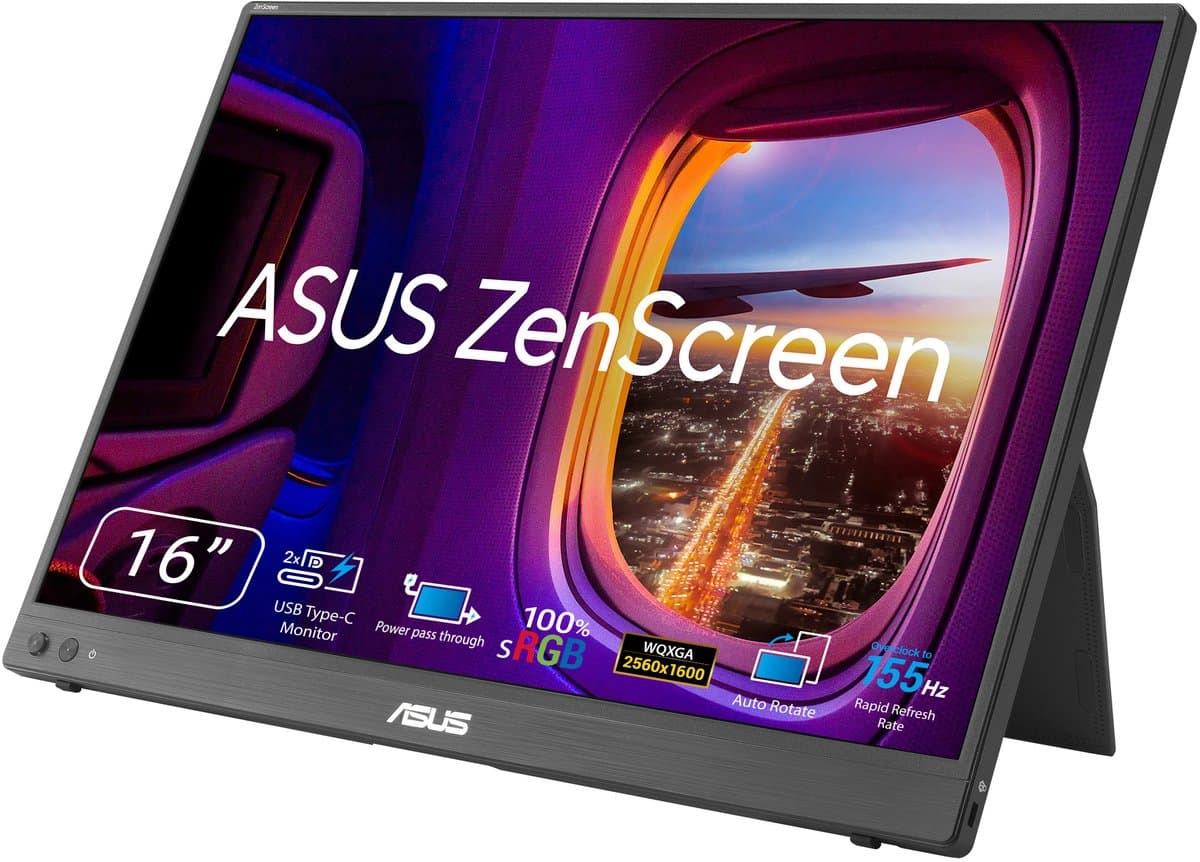
Our top pick
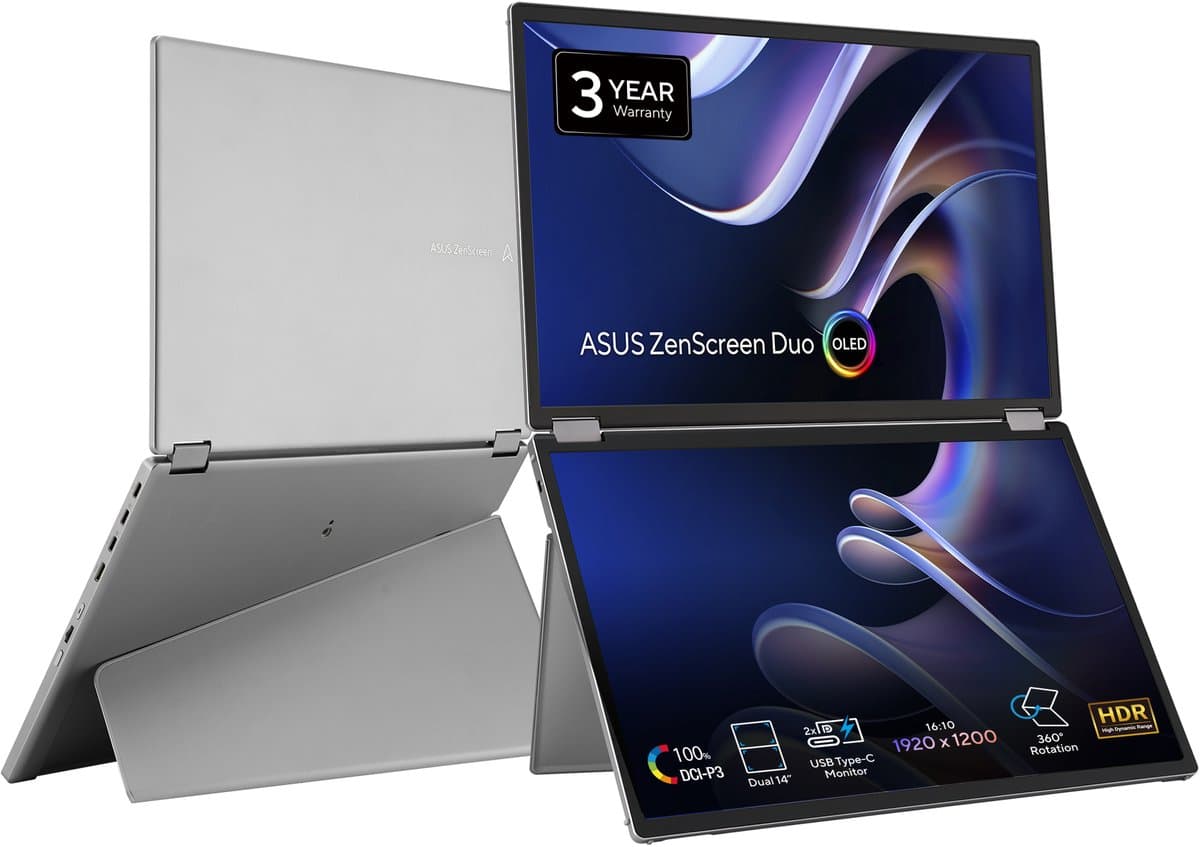
ASUS ZenScreen MB16AHV
Best overall
From
€ 161,00
at Coolblue
Top producten vergelijken


Top 6 portable monitors 2026 reviewed: USB-C single-cable, OLED, touch and Steam Deck ready. Live EU prices and authenticity check Bol/Coolblue.
Quick picks: the best portable monitors of 2026 at a glance
- Best overall: ASUS ZenScreen MB16AHV — 15.6" FHD IPS, USB-C single-cable, around 0.7 kg. From around €180 at Bol, Coolblue and Megekko.
- Best OLED quality: ASUS ZenScreen OLED MQ16AHE — 15.6" FHD OLED with 100% DCI-P3, ultra-thin. From around €350.
- Best touch + pen: Lenovo ThinkVision M14t Gen 2 — 14" FHD IPS touch with Precision Pen, USB-C. From around €330.
- Best handheld gaming (Steam Deck / ROG Ally): ASUS ZenScreen MB16NCG — 15.6" FHD OLED, lightweight, matched to handheld color. From around €280.
Looking for the best portable monitor of 2026? We focus on what mobile knowledge workers and digital nomads in Europe actually need: USB-C single-cable that works with your laptop (the #1 buying trap), Steam Deck / ROG Ally / Legion Go pairing, an authenticity check against knock-off brands on Bol Plaza marketplace, and the 14-day return policy for travellers. Fresh 2025-2026 models only — no Lenovo ThinkVision M14 from 2022 still listed as number one elsewhere.
Mostly gaming at a desktop? See best gaming monitor 2026. Want OLED for color-critical work? See best OLED monitor 2026. For the broader picture: best monitors 2026 hub.
How we assess portable monitors
This guide is compiled from manufacturer specifications, published test data (including rtings.com and Wirecutter) and our own multi-retailer price monitor. The six models were assessed on the following criteria:
- USB-C single-cable — does it work as single-cable with MacBook M-series, Dell XPS 13, Lenovo ThinkPad X1 and Steam Deck? Which ports support DP Alt Mode?
- Weight in a laptop bag — what you feel daily, not just the spec.
- Brightness in sunlight — usable on a terrace or train window seat?
- Battery hours (where applicable) in real use.
- Authenticity — ordering through Bol Plaza first-party vs marketplace third-party for brands like INNOCN.
- Price and stock at Bol, Coolblue, Megekko, Mediamarkt and Amazon NL/EU.
We earn affiliate commission via our links; this does not influence the ranking.
USB-C compatibility — the #1 buying trap
A portable monitor with "USB-C" only works as single-cable if your laptop's USB-C port supports DP Alt Mode (DisplayPort over USB-C). Not every USB-C port does. Check per laptop brand:
- MacBook M-series (M1/M2/M3/M4): every USB-C port supports DP Alt Mode. No issue.
- Windows laptops: depends on model and port. Check the spec sheet for "DisplayPort 1.4 over USB-C" or "Thunderbolt 3/4" → works. A port that only says "USB-C 3.2" without DP mention → often does not work.
- Steam Deck / ROG Ally / Legion Go: all three support DP Alt Mode via the USB-C port. Note: a handheld often cannot power both the screen and itself at the same time — an external USB-C PD adapter around 65W is needed in that case.
Fallback: every pick on this list has mini-HDMI as backup. Laptop without DP Alt Mode? Then USB-A for power + mini-HDMI for picture always works, just not single-cable.
ASUS ZenScreen MB16AHV — Best overall (around €180-€230)
TL;DR: The ASUS ZenScreen MB16AHV is the best all-round portable monitor of 2026. 15.6" FHD IPS, USB-C single-cable, around 0.7 kg and shipped with the iconic Smart Case that doubles as a stand. Strongly positioned in the €200 zone — no knock-off risk (ASUS is an established brand).
Who it is for: Mobile knowledge workers, sales consultants and digital nomads who want an affordable second screen for laptop work. Pairs with MacBook (M-series) and most recent Windows laptops.
What stands out: USB-C single-cable works directly with MacBook M-series and most recent Windows thin-and-lights. The Smart Case is more thoughtful than most competitors (two tilt angles). Anti-glare coating is usable in train and café lighting. ASUS provides 2 years of EU warranty.
Drawbacks: No touch and no pen support. 60Hz refresh — fine for productivity, not for gaming. No built-in battery; power always via laptop or external PD. Brightness around 250 nits falls short on a sunny terrace.
Compare prices — ASUS ZenScreen MB16AHV
More from Asus · Prices verified: 1 days ago · 1 shop

ASUS ZenScreen OLED MQ16AHE — Best OLED quality (around €350-€430)
TL;DR: The ASUS ZenScreen OLED MQ16AHE is the sharpest pick if color and quality matter above all. 15.6" FHD OLED with 100% DCI-P3 coverage, ultra-thin (around 0.6 kg) and USB-C single-cable.
Who it is for: Creatives on the move — Lightroom retouching on location, video preview, design work. Also nice for anyone who simply wants a better image than an IPS panel can deliver.
What stands out: Out-of-the-box color rivals more expensive desktop OLED panels — full DCI-P3 coverage, infinite black. Weight under 0.6 kg makes it a genuine travel companion. Magnetic cover doubles as a stand.
Drawbacks: Glossy OLED coating reflects heavily in sunlight — not for terrace work. No touch. Price roughly double an IPS portable. Burn-in is theoretical; in mobile use it is negligible (no 8h+ static taskbar).
Compare prices — ASUS ZenScreen Duo OLED MQ149CD
More from Asus · Prices verified: 22 h ago · 2 shops

Lenovo ThinkVision M14t Gen 2 — Best touch + pen (around €330-€400)
TL;DR: The Lenovo ThinkVision M14t Gen 2 is the most thoughtful touch portable of 2026. 14" FHD IPS touch with Lenovo Precision Pen support, USB-C single-cable and solid build quality.
Who it is for: Designers, UX professionals and consultants who want to sketch, annotate or take OneNote notes on the move. Also strong for presentations with live annotation.
What stands out: Touch + pen feels precise (4096 pressure levels). 14" is slightly smaller than 15.6" models, making travel easier — fits in a MacBook 13" bag. USB-C single-cable works directly with MacBook and compatible Windows laptops.
Drawbacks: 14" can feel cramped as a second screen for some users. No OLED. Pricier than comparable non-touch models. Pen sometimes sold separately depending on bundle.
ASUS ZenScreen MB16NCG — Best handheld gaming (around €280-€350)
TL;DR: The ASUS ZenScreen MB16NCG is the sharpest pick for Steam Deck, ROG Ally or Legion Go players who want to run their handheld on a bigger screen. 15.6" FHD OLED with 100% DCI-P3, lightweight (around 0.7 kg) and visually matched to handheld OLED screens.
Who it is for: Handheld gaming at a hotel or on a visit; also usable as a laptop second screen. Not for pure office users — better ASUS picks exist.
What stands out: OLED color next to Steam Deck OLED or ROG Ally X feels visually cohesive. Refresh up to 144Hz — top of the portable market. USB-C with DP Alt Mode plus mini-HDMI fallback. Steam Deck setup: USB-C cable to monitor + USB-C PD adapter (around 65W) on the handheld's second port for power.
Drawbacks: INNOCN is less well-known than ASUS or Lenovo. Important: buy only through Bol Plaza first-party (own stock) or Amazon direct sale, NOT via Bol marketplace third-party — that is where knock-offs with identical model names appear. Warranty runs via the importer; keep the invoice.
Compare prices — ASUS ZenScreen MB16NCG
More from Asus · Prices verified: 22 h ago · 2 shops
Lenovo ThinkVision M15 — Best budget business (around €180-€230)
TL;DR: The Lenovo ThinkVision M15 is a no-nonsense budget portable for corporate flex workstations. 15.6" FHD IPS, USB-C single-cable, protective sleeve included. No touch, no OLED, no battery — pure productivity tool.
Who it is for: Employers buying multiple portable monitors for flex employees. Or solo business users not wanting to pay more than necessary.
What stands out: Lenovo's build quality and corporate IT warranty path (often NBD swap inside enterprise environments). USB-C single-cable works directly.
Drawbacks: Experience identical to ASUS MB16AHV; pick based on the price difference of the day. No extras. Limited brightness.
ASUS ZenScreen MB17AHG — Best with built-in battery (around €200-€260)
TL;DR: The ASUS ZenScreen MB17AHG is the only affordable portable with a serious built-in battery (around 3 hours). 15.6" FHD IPS, solid stand, slightly heavier (around 0.9 kg).
Who it is for: Sales consultants or trainers presenting at a client site who don't want to hunt for power outlets. Also nice for long train trips where you want to preserve laptop battery.
What stands out: The battery sidesteps the #1 portable-monitor problem: a laptop loses 25-35% of battery life when it also powers the external monitor. ViewSonic's stand is more stable than magnetic covers.
Drawbacks: Weight around 0.9 kg is noticeable daily. 60Hz, no touch, no OLED. Battery hours claim runs higher than reality (expect 2.5-3 hours in practice).
Compare prices — ASUS ZenScreen MB17AHG Portable Monitor
More from Asus · Prices verified: 22 h ago · 3 shops

Comparison table
| Model | Size | Panel | Resolution | Refresh | Touch | Pen | Battery | Weight | USB-C PD | From |
|---|---|---|---|---|---|---|---|---|---|---|
| ASUS ZenScreen MB16AHV | 15.6" | IPS | FHD | 60Hz | no | no | no | around 0.7 kg | input only | €180 |
| ASUS ZenScreen OLED MQ16AHE | 15.6" | OLED | FHD | 60Hz | no | no | no | around 0.6 kg | input only | €350 |
| Lenovo ThinkVision M14t Gen 2 | 14" | IPS touch | FHD | 60Hz | yes | yes | no | around 0.7 kg | input only | €330 |
| ASUS ZenScreen MB16NCG | 15.6" | OLED | FHD | 144Hz | no | no | no | around 0.7 kg | input only | €280 |
| Lenovo ThinkVision M15 | 15.6" | IPS | FHD | 60Hz | no | no | no | around 0.7 kg | input only | €180 |
| ASUS ZenScreen MB17AHG | 15.6" | IPS | FHD | 60Hz | no | no | around 3h | around 0.9 kg | input only | €200 |
Steam Deck / ROG Ally / Legion Go — handheld gaming setup
Handheld gaming on a portable monitor is a growth segment in 2025-2026, and no US review gives it a dedicated section. Per handheld:
- Steam Deck (LCD and OLED): the USB-C port supports DP Alt Mode. Recommended: ASUS ZenScreen MB16NCG or ASUS ZenScreen OLED MQ16AHE for visual match. Power budget: Steam Deck cannot power the screen and charge itself through the same USB-C port at once — use a dock (official Valve Dock or third-party) or an external USB-C PD adapter around 65W.
- ROG Ally / Ally X: identical setup. The ROG Ally has the ASUS XG Mobile port as an alternative for external GPU, but for portable monitor it is plain USB-C with DP Alt Mode.
- Legion Go: supports USB-C DP Alt Mode plus its own kickstand — handy in a hotel room with the portable monitor alongside.
Recommendation for handheld gaming + portable: ASUS ZenScreen MB16NCG (OLED, 144Hz, visually matched) or ASUS ZenScreen OLED MQ16AHE (premium quality, lighter). For laptop + portable as second screen: ASUS MB16AHV (best value) or ZenScreen OLED for creative work.
How to choose the right portable monitor
Four questions get you there fast:
- Primary use case. Pure office work → ASUS MB16AHV or Lenovo M15. Creative/photo → ZenScreen OLED. Designer with pen → Lenovo M14t Gen 2. Handheld gaming → ASUS ZenScreen MB16NCG.
- Touch yes or no. Touch costs around €100 extra. Only worth it if you actually tap or swipe — for passive second-screen work it adds no value.
- Battery yes or no. Only relevant if you present without a power outlet (ASUS ZenScreen MB17AHG) or often work on a train or plane where laptop battery is tight.
- Size and weight. 14" for maximum portability (M14t Gen 2). 15.6" for daily dual-screen. OLED costs slightly more but looks better.
Pairing a portable monitor with a new laptop? Read best laptop 2026.
EU prices, knock-off risk and return policy
Portable monitors are the segment where Bol Plaza and Amazon NL marketplace fill up with knock-off brands: UPERFECT, Arzopa, MNN and various brand names using identical product photos but varying internals. This is not automatically bad — but it makes warranty tracing difficult.
Authenticity check:
- Bol Plaza first-party (sold and shipped by bol) — Bol's own stock, EU warranty via Bol.
- Coolblue / Megekko / Mediamarkt — own stock, Dutch helpdesk, EU warranty.
- Bol marketplace third-party — variable; avoid for portable monitor SKUs.
- Amazon NL — note "sold by Amazon" vs "sold by [seller]".
EU warranty: 2 years statutory minimum. With grey-market imports (some marketplace sellers) you often get only 1 year via the seller in practice. Through Coolblue / Bol Plaza / Megekko: 2 years uncontested.
Return policy for travellers: 14 days statutory cooling-off period. Plan the purchase at least 2 weeks before your trip so you can test calmly and exchange if needed.
Refurbished: Lenovo Refurb and Dell Outlet have limited portable monitor stock — interesting if you happen to spot a match. Read refurbished buying tips.
Frequently asked questions
Does a portable monitor work with my laptop via a single USB-C cable?
Only if your laptop's USB-C port supports DP Alt Mode. MacBook M-series: always. Recent Windows: usually, check the spec sheet ("DisplayPort over USB-C" or "Thunderbolt"). Otherwise: USB-A for power + mini-HDMI for picture as fallback.
Does my Windows laptop have DP Alt Mode on the USB-C port?
Check the spec sheet or laptop manual for mentions like "DisplayPort 1.4 over USB-C", "Thunderbolt 3" or "Thunderbolt 4". A port that only says "USB-C 3.2 Gen 2" with no DP mention usually does not support it. Test in store with a portable monitor if uncertain.
Can I use a portable monitor with Steam Deck or ROG Ally?
Yes, all three handhelds (Steam Deck, ROG Ally, Legion Go) support DP Alt Mode over USB-C. Note: the handheld often cannot both power the screen and charge itself — add an external USB-C PD adapter (around 65W) or use a dock with multiple ports.
Do I need touch on a portable monitor?
Only if you actually tap or swipe (designer, illustrator, presenter with annotation). For passive second-screen work (extra browser, extra IDE) it adds no value. Touch costs around €100 extra.
Is an OLED portable monitor worth the money?
For creative work (photo, video, design): yes — DCI-P3 100% and infinite black make a visible difference. For pure productivity (Word, Excel, browser): IPS is sufficient and saves €150-€200. Burn-in is not a practical issue in mobile use.
How much does a good portable monitor weigh?
Between 0.6 and 0.9 kg. ASUS ZenScreen OLED sits around 0.6 kg (lightest premium). Standard IPS models around 0.7 kg. With battery (ASUS ZenScreen MB17AHG) toward 0.9 kg. Feel it in your laptop bag — under 0.7 kg is barely noticeable, above 0.9 kg you notice daily.
How do I spot a knock-off portable monitor on Bol/Amazon?
Check: (1) sold by Bol/Amazon itself (not marketplace third-party), (2) recognised brand name (ASUS, Lenovo, Dell, LG, ViewSonic, INNOCN with direct sale), (3) explicit "2 year EU" warranty text, (4) verified-buyer reviews with photos. In doubt: buy via Coolblue, Megekko or Mediamarkt — no marketplace issue there.
What is the battery life and do I need it?
ASUS ZenScreen MB17AHG delivers around 3 hours in practice. Only relevant if you present without a power outlet (client demo) or work on a train or plane and want to preserve laptop battery. For home-office or café with power: not needed, since power runs from the laptop via USB-C.
Also read
- Best gaming monitor 2026 — focused on refresh, response and console compatibility
- Best OLED monitor 2026 — for creative work and productivity OLED
- Best monitors 2026 hub — overview of every monitor category
- Best laptop 2026 — pair with a new laptop
- Refurbished buying tips — save 20-35% on grade A
Meer producten vergelijken

Got a question? Just ask.
We'll email you back within 24 hours. No sales pitch.