EAN: 6096355988951
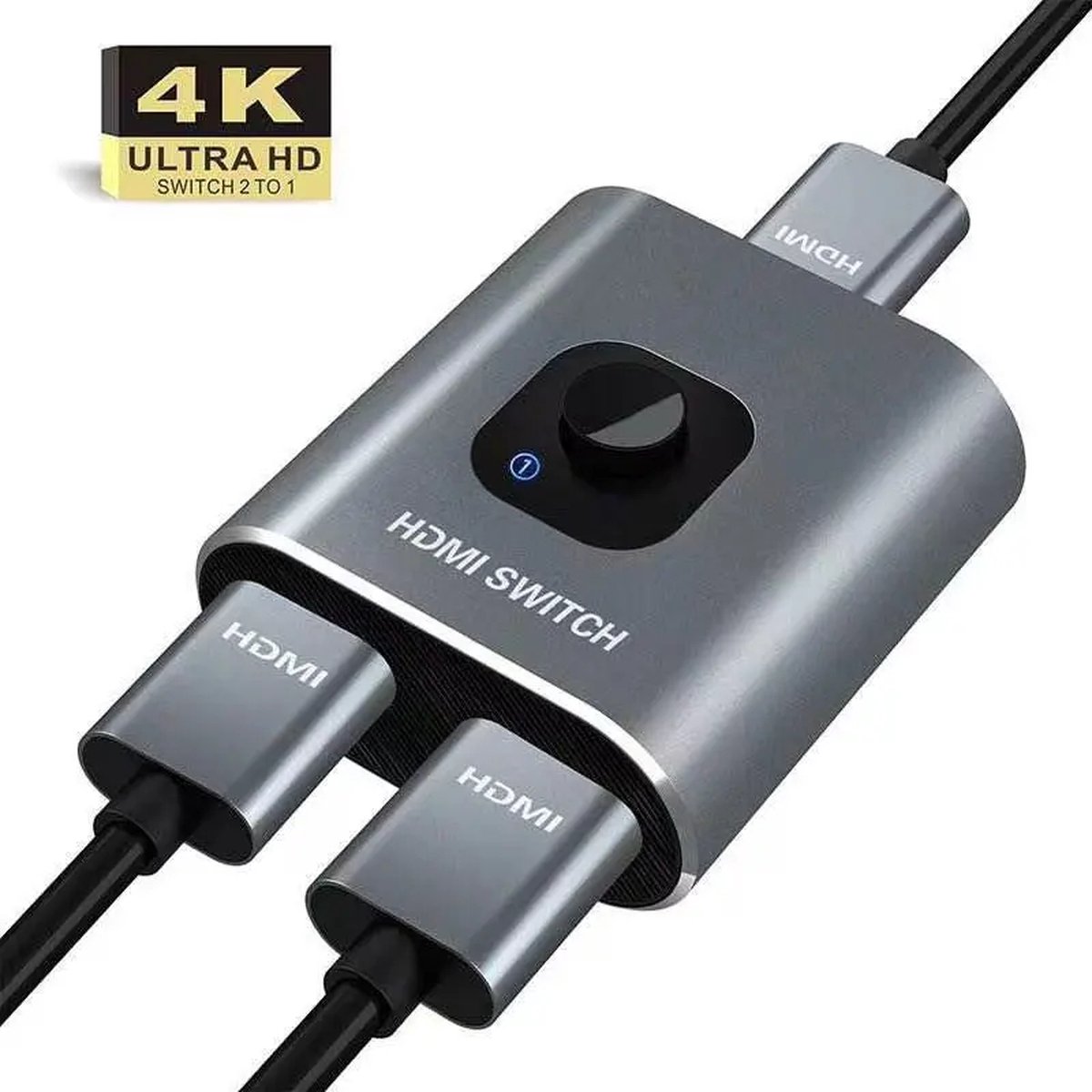
In Switch mode (works as HDMI Switch), offers 2 HDMI inputs to connect with 1 HDMI display, you can switch between them to avoid the damage of the HDMI display caused by plugging and unplugging the HDMI cable.
1. Connect the signal hosts(for example: PC, PS4) to the 2 HDMI input ports (HDMI cables are not included).
2. Connect the hdmi switch to a display (TV or Monitor), please remember to set the signal source to HDMI.
3. Press the “select” button to select the signal host manually.
In Splitter mode (works as HDMI Splitter), offers 1 HDMI device with 2 external HDMI displays. (only 1 display can be displayed at a time).
1. Connect the signal hosts(for example: TV Box or Stick) to the 1 HDMI input ports (HDMI cables are not included).
2. Connect the hdmi switch to the displays (TV & Monitor), please remember to set the signal source to HDMI.
3. Press the “select” button to select the signal host manually.
Manually SwitchingFreely switch between your favorite devices without plugging and unplugging. Avoid damage to your display interfaces.
LED Indicators
The Blue indicator shows which HDMI source is in use at present, transmit video and audio simultaneously
Compact Design
Portable and compact design, it is small enough to put in your pocket without taking much space.
Aluminum Case
The robust housing made of high-quality aluminum alloy can dissipate heat quickly and does not adhere to fingerprints.
Broad Compatibility
Supports compatible with PC, Laptop, Xbox 360, Xbox One, PS3 / PS4, Blu-Ray DVD player, Satellite receivers, Roku, Fire Stick, and a lot more.
No Power Required
Simply plug and play, no extra power required, single push of the button to switch the devices (HDMI Cable is not included).
Use Tips:
1. In splitter mode, only 1 of the 2 displays works at a time.
2. This HDMI Switch 4K can't switch automatically, ONLY by MANUALLY pressing the SELECT button.
3. For some input devices that run 4K@120hz, please lower the resolution to 4K@60hz.
4. If your PS4 Pro run 4K/60Hz, please LOWER the resolution from 2160P-RGB to 2160P-YUV420, or to1080P. For xbox one x series, please lower to 3840x2160@25hz.
5. It is recommended that the total length of HDMI cable is ≤3M if you need to get 4K@60hz video connections.
De HDMI Switch - 2-in-1 Out / 1-in-2 Out – Bi-directional – Supports 4K-60Hz, 1080p-120Hz is momenteel niet beschikbaar bij onze partnerwinkels. Bekijk de vergelijkbare producten hieronder of kom later terug.
Ook bij Amazon
Vergelijk de prijs op Amazon.nl
We mailen je binnen 24 uur een antwoord over de HDMI Switch - 2-in-1 Out / 1-in-2 Out – Bi-directional – Supports 4K-60Hz, 1080p-120Hz. Geen verkooppraat.
In Switch mode (works as HDMI Switch), offers 2 HDMI inputs to connect with 1 HDMI display, you can switch between them to avoid the damage of the HDMI display caused by plugging and unplugging the HDMI cable.
1. Connect the signal hosts(for example: PC, PS4) to the 2 HDMI input ports (HDMI cables are not included).
2. Connect the hdmi switch to a display (TV or Monitor), please remember to set the signal source to HDMI.
3. Press the “select” button to select the signal host manually.
In Splitter mode (works as HDMI Splitter), offers 1 HDMI device with 2 external HDMI displays. (only 1 display can be displayed at a time).
1. Connect the signal hosts(for example: TV Box or Stick) to the 1 HDMI input ports (HDMI cables are not included).
2. Connect the hdmi switch to the displays (TV & Monitor), please remember to set the signal source to HDMI.
3. Press the “select” button to select the signal host manually.
Manually SwitchingFreely switch between your favorite devices without plugging and unplugging. Avoid damage to your display interfaces.
LED Indicators
The Blue indicator shows which HDMI source is in use at present, transmit video and audio simultaneously
Compact Design
Portable and compact design, it is small enough to put in your pocket without taking much space.
Aluminum Case
The robust housing made of high-quality aluminum alloy can dissipate heat quickly and does not adhere to fingerprints.
Broad Compatibility
Supports compatible with PC, Laptop, Xbox 360, Xbox One, PS3 / PS4, Blu-Ray DVD player, Satellite receivers, Roku, Fire Stick, and a lot more.
No Power Required
Simply plug and play, no extra power required, single push of the button to switch the devices (HDMI Cable is not included).
Use Tips:
1. In splitter mode, only 1 of the 2 displays works at a time.
2. This HDMI Switch 4K can't switch automatically, ONLY by MANUALLY pressing the SELECT button.
3. For some input devices that run 4K@120hz, please lower the resolution to 4K@60hz.
4. If your PS4 Pro run 4K/60Hz, please LOWER the resolution from 2160P-RGB to 2160P-YUV420, or to1080P. For xbox one x series, please lower to 3840x2160@25hz.
5. It is recommended that the total length of HDMI cable is ≤3M if you need to get 4K@60hz video connections.
De HDMI Switch - 2-in-1 Out / 1-in-2 Out – Bi-directional – Supports 4K-60Hz, 1080p-120Hz is een product. Op deze pagina vind je de volledige productinformatie, actuele prijzen en reviews.
Er is op dit moment geen actuele prijs voor de HDMI Switch - 2-in-1 Out / 1-in-2 Out – Bi-directional – Supports 4K-60Hz, 1080p-120Hz beschikbaar. Controleer later opnieuw of bekijk vergelijkbare producten.
De HDMI Switch - 2-in-1 Out / 1-in-2 Out – Bi-directional – Supports 4K-60Hz, 1080p-120Hz heeft (nog) geen eigen reviewscore. Op Productvraag staat gemiddeld een waardering van 4,85/5 op basis van 1178 reviews van bezoekers.
De HDMI Switch - 2-in-1 Out / 1-in-2 Out – Bi-directional – Supports 4K-60Hz, 1080p-120Hz is op dit moment niet beschikbaar bij onze partnerwebshops. Kijk later opnieuw voor actuele beschikbaarheid.
De prijzen worden dagelijks automatisch ververst vanuit onze partnerwebshops. De definitieve prijs inclusief eventuele acties zie je op de webshop zelf.
Productvraag verzamelt productinformatie, prijzen en reviews van Nederlandse webshops op één plek. Zo kun je snel zien wat een product kost, wat gebruikers ervan vinden en waar je het kunt kopen.